When Does a Context Layer Pay Off for AI Agents? A Text-to-SQL Benchmark

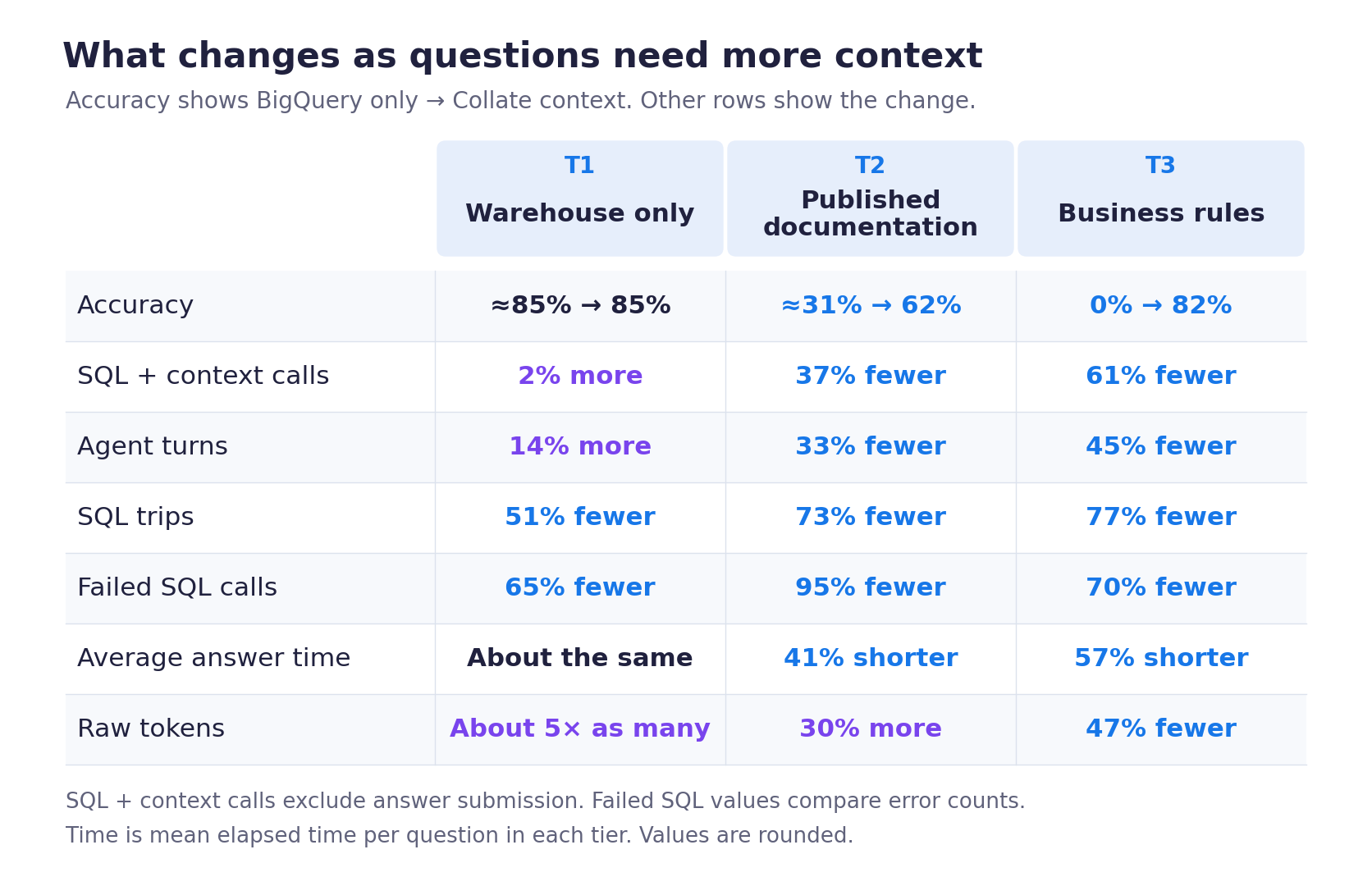
Context layers are transforming the way frontier models work, making them more accurate and efficient for the specific data and business landscape of each organization. When an LLM has an organization’s unique metadata, business meaning, and organizational memory in a context layer, it can better identify the correct data and interpret its analysis. We tested a plain text-to-SQL agent on three tiers of questions, from ones the warehouse alone can answer to ones that need the business’s own definitions. Each question ran twice, once with access to context in Collate and once without, and we tracked accuracy alongside turns, SQL trips, answer time, and tokens. Each tier showed a different trade-off. For business-heavy questions, the agent went from 0% correct without context to 82% correct with it, used about half the tokens, made 77% fewer SQL trips, and answered in less than half the time.
Results by question tier, without → with Collate context:
| Question tier | Accuracy | Avg. answer time | Agent turns | SQL trips | Raw tokens |
|---|---|---|---|---|---|
| T1: Warehouse data | 85% → 85% | ~55s → ~55s | +14% | −51% | 370K → 1.9M |
| T2: Published docs | 31% → 62% | 1m 50s → 1m 05s | −33% | −73% | 1.0M → 1.3M |
| T3: Business rules | 0% → 82% | 3m 55s → 1m 40s | −45% | −77% | 2.4M → 1.3M |
Why AI agents get business questions wrong without context
Understanding the difference in AI agent performance requires understanding the different steps that an agent takes to answer a question.
Let’s walk through an agentic analytics scenario where a business analyst is asking an AI agent for the Cohort Health Index of their user base. The agent is powered by a frontier model with access to a data warehouse, and works through multiple steps to answer the analyst’s question. It inspects the events table, reads sample rows, and writes SQL to pull data. It then runs 20 queries to find the right table and make sense of the data, self-corrects two failed queries, and checks data distributions. It spends roughly 200k tokens, then returns its answer to the analyst in the format requested.
While the answer appears correct, the values are unfortunately wrong. The agent is missing key context necessary to correctly analyze the data, details that differ from the generic definitions the model learned in training:
-
The business has a specific definition of Cohort Health Index that the agent did not know to retrieve and use.
-
The agent inferred what certain dates meant, incorrectly expanding the time windows for the analysis.
-
It also missed eligibility rules about which users or events should count toward the metric.
This necessary context for understanding the data and business is absent from the data warehouse, leading the agent to make incorrect assumptions and deliver an incorrect result. While a human might be able to fill in certain gaps thanks to their institutional knowledge and experience in the domain, an agent can only act on what is stored in the system.
If we give the same agent the right context, it takes a different set of steps in its analysis. It searches the metadata catalog, finds the KPI contract that precisely defines the Cohort Health Index, and reads it. With the contract in hand, it knows the exact tables to query, how they map to the business definitions, and the correct way to calculate the eligibility and time period. This enables the agent to deliver the correct answer. Additionally, since it does not need to search for the right tables and definitions, it can complete the work with fewer queries and fewer tokens, resulting in time savings.
It is ironic that the first run takes more queries, turns, tokens, and time, only to deliver an incorrect result that the business analyst would have to error-check and redo. This is why context matters for AI agents to deliver the right answer, as OpenAI showed in its keynote presentation at our Summit on its own context strategy, powered by Collate’s open context platform OpenMetadata.
How we measured a context layer’s impact on a text-to-SQL agent
This is the latest post in our Token Efficiency series. The first explained why we built a native agentic harness for data. In the previous benchmark post, we measured what it costs to run Collate's own agents in production. By changing how our harness reuses context, we cut mean raw tokens per turn by 68% and reduced spend per turn by 67%. For this benchmarking exercise, we wanted to measure the impact of Collate’s context. To do so, we ran the same agent in two setups: one that can only run SQL against the warehouse, and one that can also fetch context from Collate when it decides it needs it. An earlier benchmark measured how context improves text-to-SQL accuracy on Spider 2.0. This one breaks the effect down by the kind of question being asked.
Three tiers of questions: warehouse data, published docs, business rules
We wanted to understand how different kinds of questions require different kinds of context, which leads to different performance results. The opening example depends on key business rules. Other questions need only the schema and the rows, or published documentation.
We tiered the questions by the layers of context that the agent would need to look at in order to answer the question correctly. Note that this is different from the complexity of the SQL query. A one-line question may appear simple, but can depend on deeper business definitions that may be missing from documentation.
| Tier | What the question needs | Example |
|---|---|---|
| T1 | The schema and warehouse rows | Which products were bought together? |
| T2 | The data and published documentation | Which page views count as product detail pages? |
| T3 | The data and private business rules | What is our Cohort Health Index? |
We compared the same agent with and without Collate context in each tier of questions, using Claude Opus 5 and Google BigQuery, and tracked different dimensions of its performance.
Tier 1: When the warehouse holds the answer, extra context adds tokens without improving accuracy
Let’s take a question where all the necessary context is already in the data warehouse. The column names and schema are sufficient for the agent to answer the question correctly, so all the agent needs to do is find the right table and write the correct query. This might be a question that combines the products and customers tables, where the purchases and quantities data is immediately available.
Additional context outside the data warehouse did not materially change accuracy in this tier, which stayed at about 85% with or without context. Answers took about the same time to come back, roughly 55 seconds on average. But the agent with context took 14% more turns, and raw tokens rose from about 370k to 1.9 million.
The agent also moved part of its work out of the warehouse. SQL queries fell from 104 to 51, and failed SQL calls fell from 20 to 7. It also made 55 calls to Collate to search for and read context, which replaced much of its SQL exploration: the combined call count held steady while SQL trips roughly halved.
For these questions, the extra context reduced warehouse work, but it added turns and tokens without improving accuracy: the agent had more information to process than it needed.
Tier 2: Published documentation doubled agent accuracy from 31% to 62%
Now consider a question where the data may be in the data warehouse, but the agent needs additional documentation in order to interpret the data correctly. Take a question about the share of page views that came from product detail pages. While the data is in the data warehouse, the agent needs the page-classification rules from public documentation to interpret it correctly.
Accuracy rose from about 31% to 62%, with 33% fewer turns and 73% fewer SQL trips. Failed SQL calls dropped from 22 to 1, and average answer time dropped from about 1 minute 50 seconds to 1 minute 5 seconds.
Reading the documentation took 52 calls to Collate, while SQL trips fell by 105. The agent fetched the rules from Collate instead of trying to infer them through more warehouse queries. Even including those context calls, the combined call count fell by about 37%.
Raw tokens still rose 30%, from about 1.0 million to 1.3 million, for twice as many correct answers. Once we applied the different token prices, the model-cost estimate came out about 8% lower. That estimate covers model tokens only. Judging this tier by raw tokens alone would miss most of what improved.
Tier 3: Business rules took agent accuracy from 0% to 82%
For this last tier of questions, the agent needs the most context in order to correctly understand how the business works, and to connect it to the underlying data. The Cohort Health Index question belongs in this tier. The agent needs to know which users qualify, what counts as activation or return, which time windows apply, and how the business weights the components. Those choices are defined in the KPI contract.
Without access to the contract, the agent got none of these questions right under the accuracy scorer. With context, accuracy reached about 82%. Agent turns dropped by 45%, and SQL trips went from 242 to 55, about 77% fewer.
With 39 calls to Collate for business context, the agent made 187 fewer SQL trips. Combined SQL and context calls were down about 61%, and failed SQL calls went from 23 to 7.
Average completion time fell from about 3 minutes 55 seconds to 1 minute 40 seconds, a reduction of about 57%. Raw tokens went from about 2.4 million to 1.3 million, roughly half as many.
Context helps most in this tier. While the warehouse contains the underlying data, it does not contain the business knowledge needed to answer correctly. The agent needs the full definition of the metric, including its filters, exceptions, windows, and weights. With the contract in Collate, the agent can retrieve the actual definition, instead of inferring it.
Benchmark methodology: Claude Opus 5, BigQuery, and the Collate AI SDK
We used the same direct text-to-SQL agent in two configurations. Both ran Claude Opus 5 with the same base instructions, prompt caching, budgets, question order, data, and scorer. One configuration also had Collate's read-only context tools and brief guidance on using them.
| Configuration | Tools |
|---|---|
| BigQuery only | BigQuery MCP execute_sql and submit_answer |
| With Collate context | The same tools, plus find_context, search_metadata, and get_entity_details from the Collate AI SDK |
We used public web analytics and application event data. T1 questions needed only the warehouse; T2 needed published documentation. For T3, we wrote questions around a business KPI contract and stored its definitions in Collate's glossaries, metrics, descriptions, and Context Center articles, feeding the Knowledge Graph the agent has at its disposal.
We gave both agents the question and neither of them the contract text; the agent with context had to find and read it. Collate held reference material and business definitions, with no answers and no reference SQL, so both agents wrote and ran their own queries.
The tier results combine paired runs, with each question counted once. The opening example and error patterns below come from a separate follow-up run that we kept out of those totals.
We built the business-rule questions to need definitions the warehouse cannot supply, so the percentages describe these runs. Another mix of questions, definitions, and data would give different numbers.
Each agent turn is one model call and can request several tools. Tool-call totals include SQL execution and Collate context retrieval, but exclude answer submission. SQL trips include failed attempts, and failed-query figures count errors. Answer time is the average elapsed time per question.
The figures above retain the accuracy scorer's original results. When we audited the rejected answers, some had the right values in every non-empty row plus extra zero-valued rows. We did not count those as passes.
Different ways a text-to-SQL agent fails without business definitions
Without context, the agent inspected tables, sampled rows, and wrote SQL that looked reasonable. The mistakes came from how it interpreted the data and filled in missing business definitions:
- It used the wrong dates or time zone conversions, putting events in the wrong reporting periods.
- It missed eligibility rules about which users or events should count toward a metric.
- It guessed analysis windows, thresholds, or categories instead of applying the agreed business definitions.
- It used the wrong calculation rules or weights, producing plausible results that measured something different.
While the SQL still ran and returned a clean table, the answers were incorrect.
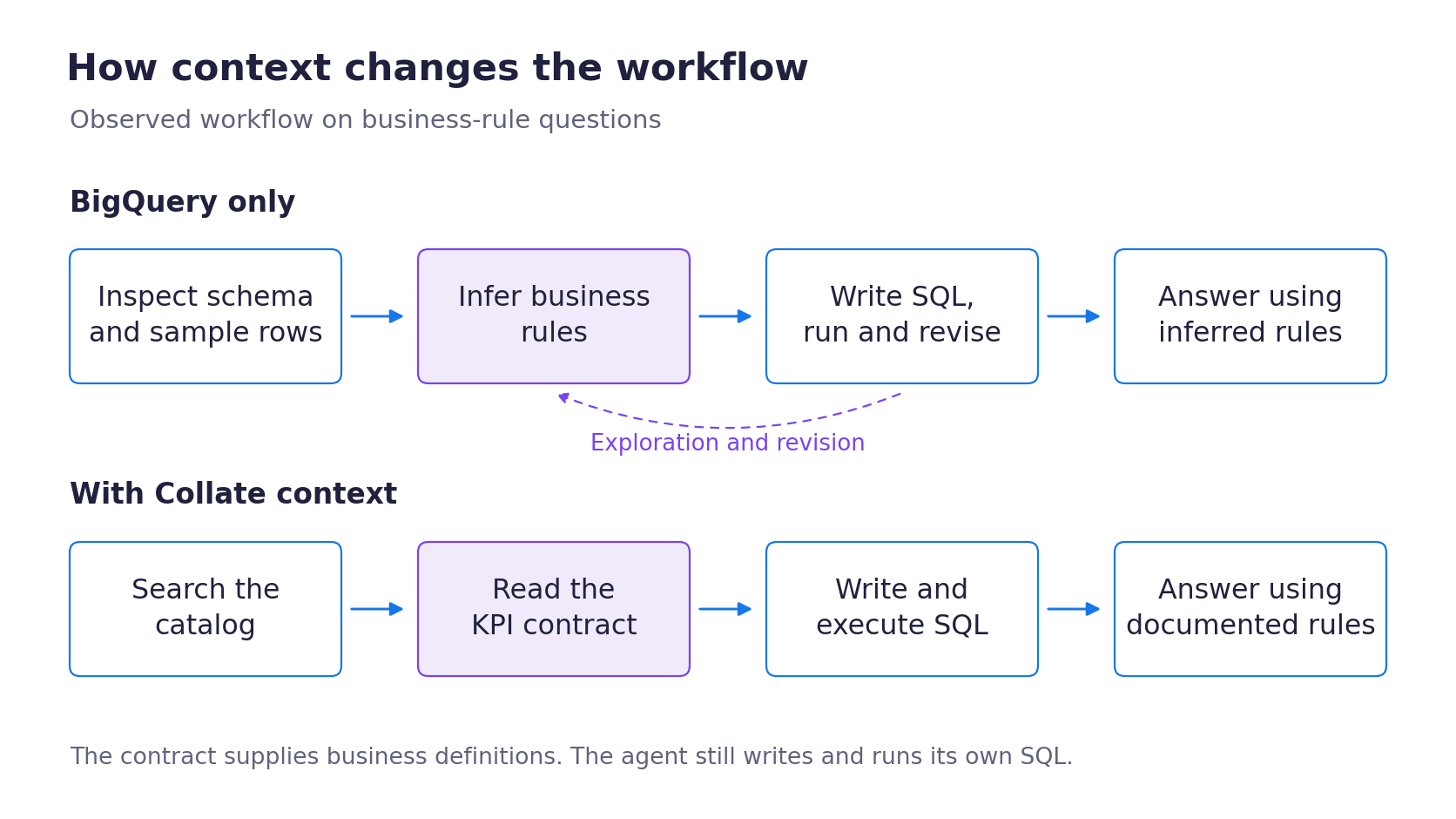
We observed that context calls replaced some exploratory SQL, reducing the warehouse time and compute those queries would have used. This means that warehouse costs can fall even when the total tool-call count stays flat.
Additionally, we noted that incorrect answers start a second round of work. An analyst has to notice the error, troubleshoot the logic, and either re-prompt the agent or fix the query by hand. We did not measure those rounds of work, though the human labor cost of rework is not trivial.
When does your AI agent need a context layer?
If the warehouse alone can answer the question, extra definitions add turns and tokens without improving the answer. If it needs a published reference, make that reference easy to find. If it depends on business rules, give the agent the complete relevant definition.
For your own agents:
- Measure by question type. Track correct answers, tool calls, agent turns, SQL trips, failed queries, response time, and tokens together.
- Retrieve context when the question calls for it. Check which lookups resolved something the query needed and which only added work.
- Store definitions where the agent can search them, linked to the tables they describe, and give business teams and data engineers one place to update them.
Try it on your own agents
The Collate AI SDK gives any agent read access to the metadata, business definitions, and memory in Collate. See AI Studio and the AI SDK, or get Collate free and connect your own agent.