Ontology Studio: The Business Context AI Agents Need

The frontier of AI agent understanding is shifting quickly. AI agents can read your tables and columns, and now need to cross that last mile to connect that data to how your business runs. There may be five tables labeled "revenue" in your data warehouse, but which one does your finance department definitively approve? How does revenue get calculated? How does revenue get distinguished from recurring revenue? Without the context of how these business processes work, AI agents have to infer it, resulting in unreliable answers and token burn while searching for information. Collate’s new Ontology Studio delivers a graphical workspace where data teams document business processes as ontologies, so AI agents understand your business and the meaning behind the data. You model your business as classes with properties and rules, bind each concept to the data that implements it, and serve the model to agents. It uses open W3C standards, so you can inspect, validate, and move the model. The result: business users get answers they can trust because the agent starts with the same business definitions finance, operations, and data teams use.
The case for a true ontology layer
Let’s take a closer look at the revenue example and what an AI agent has to work out to get it right. For a person, a written definition is enough: revenue is income from customer contracts in a period. An AI agent has to work out which transactions count, whether refunds come off, and whether last quarter's number was produced the same way. If it has to infer those answers, it can reach a different number from the same data.
An ontology makes that business concept explicit in a form an AI agent can consume. Revenue is a finance-owned metric, calculated as booked contracts minus refunds and measured monthly. Recurring revenue is a child metric that includes subscriptions only. The agent can retrieve each of those facts as structured business concepts, and use them to better interpret the natural language requests it receives.
Existing tools solve parts of this problem. Search can find tables with a revenue column, but it cannot identify which one is approved by finance. A metric layer defines how a number is calculated, but a pure metric definition cannot capture revenue’s relationship to recurring revenue or to the data behind it. Metrics are further complicated by conflicting definitions siloed across data warehouses, dashboards, and pipeline tools.
Lineage can show the relationships between data tables, but can miss other key relationships, such as that a billing customer and a CRM account refer to the same entity when no pipeline connects them. A true ontology adds a key piece to the context strategy by documenting business concepts with their relationships, while also linking each concept to the underlying data that implements it.
A glossary with relationships is not a true ontology
The need to connect business meaning to data has put the word "ontology" on many data tools in the current AI wave, often without the capabilities behind it. It helps to separate three levels.
- A glossary is written for people. Each term has a name and a description, and the only link between two terms is often "related to."
- A glossary with typed relationships goes a step further. A customer buys a product, instead of being related to it. Collate added typed relationships in 1.13, and they are a useful improvement in structuring business meaning. This is where many tools stop.
- An ontology is written for machines as well as people. Each business concept is a class with its own properties, and classes can inherit from one another: a patient is a type of person, and so is a pharmacist. The ontology model also carries rules. If the ontology says a customer can hold only one subscription, an agent can validate this, which helps ensure the integrity of the business concepts and data. If someone draws an edge saying a doctor is a type of prescription, the validation rules can catch the mistake.
When a tool says it supports ontologies, it’s worth asking: are your concepts classes with properties and rules, or simply terms with links between them? Without this higher standard of ontology structure, your AI agents won’t receive the full business context needed to understand the meaning of your data correctly.
Unifying metadata, meaning, and memory in one context platform
AI agents need complete context to understand your business and data correctly. Metadata tells an agent what data exists. Meaning, in the form of ontologies, tells it what the data represents. Memory tells it what the organization has already learned. When these live in separate tools, agents can receive incomplete or conflicting context. Your context should be open and extensible, so it can work across every data warehouse, data lake, dashboard, and system. Otherwise, you create another ontology silo in your data landscape for your AI agents and human data teams to fight against.
It’s on these principles that the open-source OpenMetadata project was created. Our open context platform was built on open standards and formats like OWL and SKOS to ensure open access and portability of your ontology. For our managed OpenMetadata service from Collate, we’ve extended our ontology capabilities with our new Ontology Studio.
Introducing Collate Ontology Studio
Ontology Studio lets you model the business, link concepts to data, and expose that context to agents. Collate users have known the earlier version as Ontology Explorer, which was built for reading an ontology model. Ontology Studio has been rebuilt for writing one, and provides a rich set of capabilities for your human teams and AI agents to work with your business meaning.
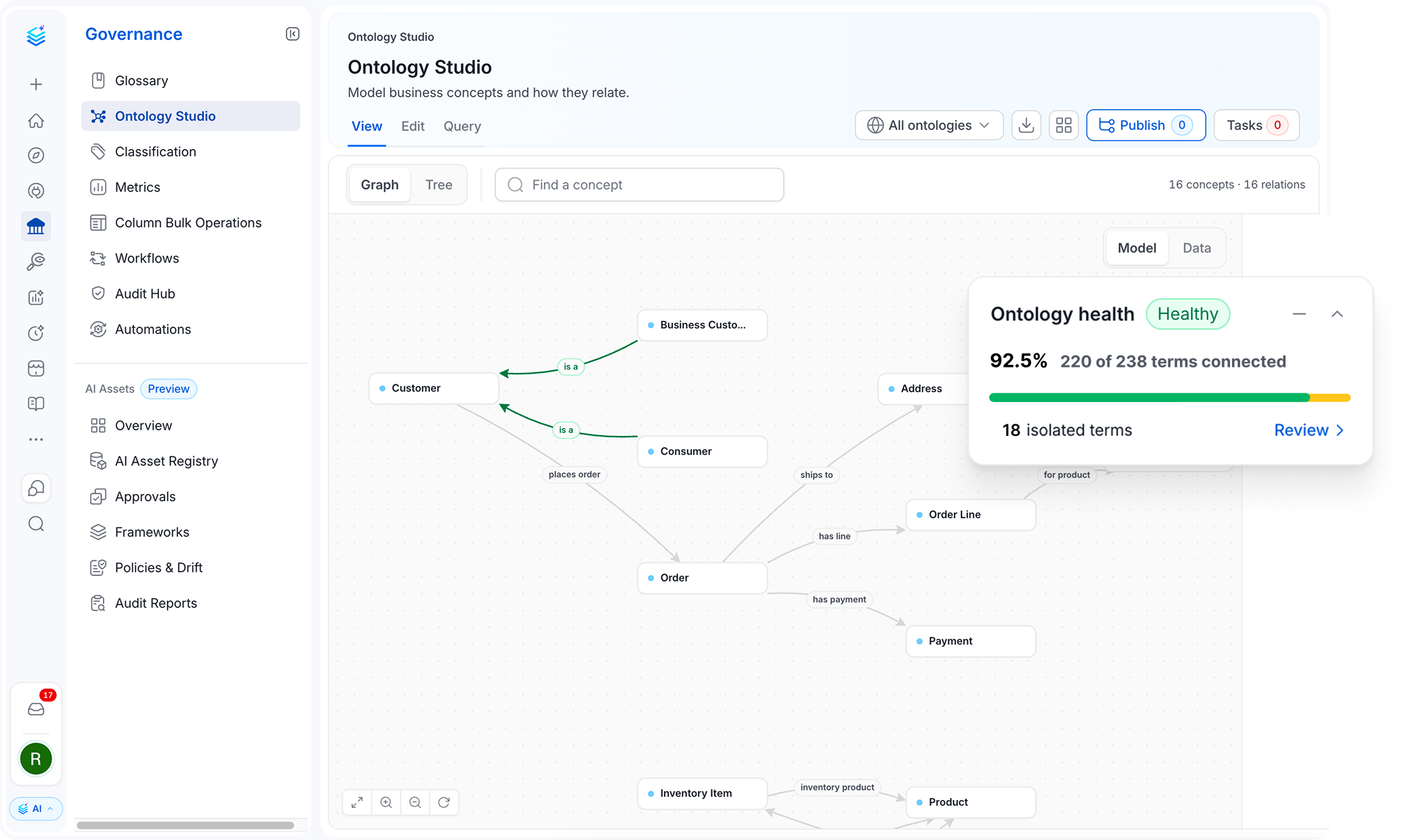
- Model business concepts as classes: Each business concept gets its own properties. An Account has an account ID, and a Loan has a principal and a term. Properties have types, can be marked as identifiers, and pass down to child concepts, so a Business Loan inherits everything a Loan has. You can also set rules: one concept is a type of another, two names mean the same thing, or two concepts can never overlap.
- Connect concepts with typed relationships: Concepts link through named relationships that work in both directions: a Loan is part of an Account, and an Account has part Loan. Use built-in types such as part of, broader and narrower, and calculated from, or define your own. Each relationship has a standard meaning, so an agent knows exactly what a link says. You can also mark one table as a concept's primary source and another as a copy, so an agent that can't reach the primary knows a copy exists, and that it is a copy.
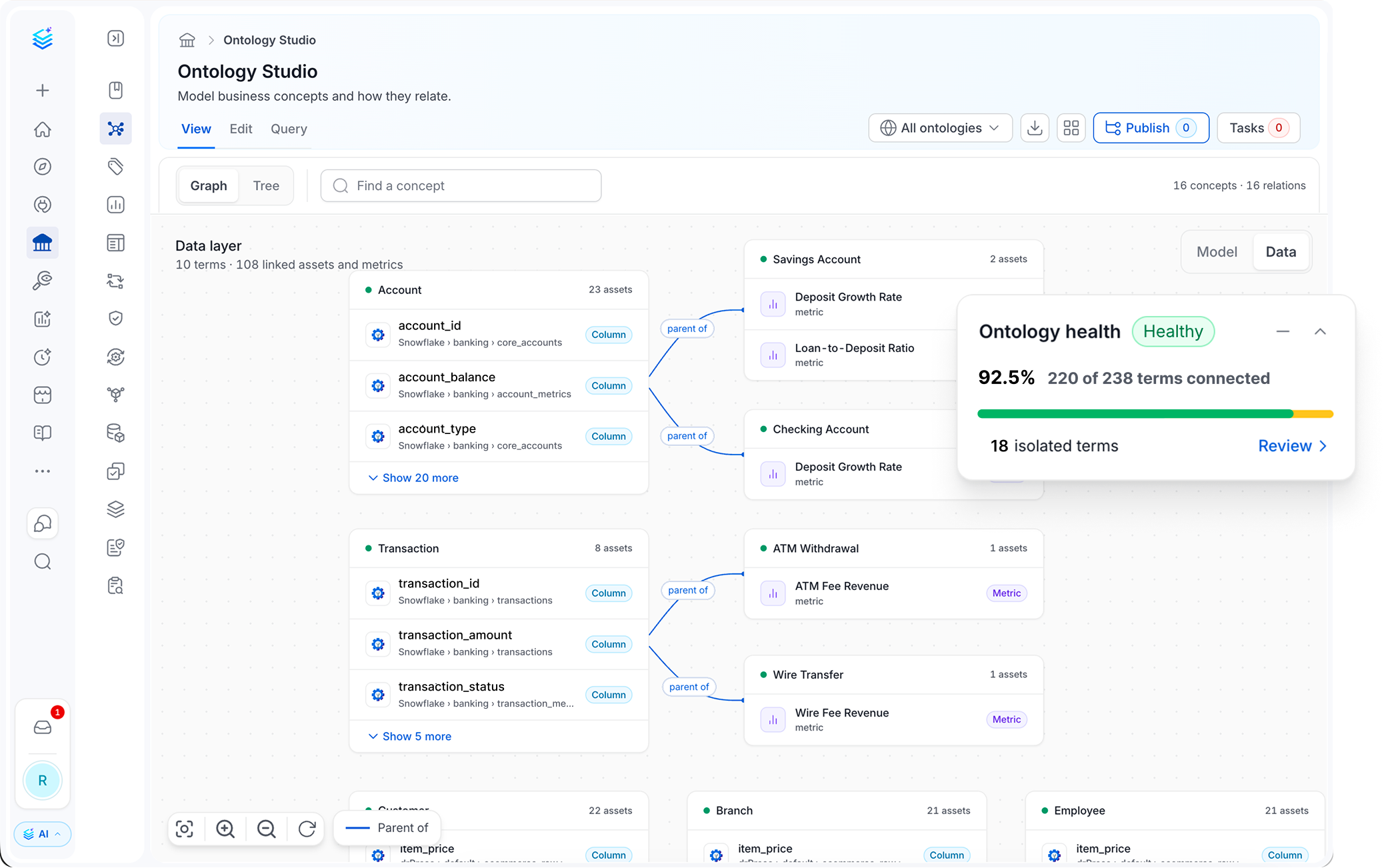
- Map meaning to your data: Switch from the model view to the data view to see the tables and dashboards behind each concept, which answers questions like "which table represents an account?" A concept links to whole tables, not single columns, because a concept like Account is a set of properties, often spread across several tables. The view also keeps two kinds of links apart: lineage your pipelines recorded, and relationships your model defines.
- Expose the model to agents: Collate's MCP server gives agents graph tools such as
ontology_describe,sparql_query,entity_neighborhood, andfind_by_tag. With them, an agent can look up a concept and its properties in one call, follow the graph to the tables that implement it, along with their owners and data quality, and show the query behind its answer so a person can check it. Collate’s AI agents also use the knowledge graph alongside vector search when they answer questions.
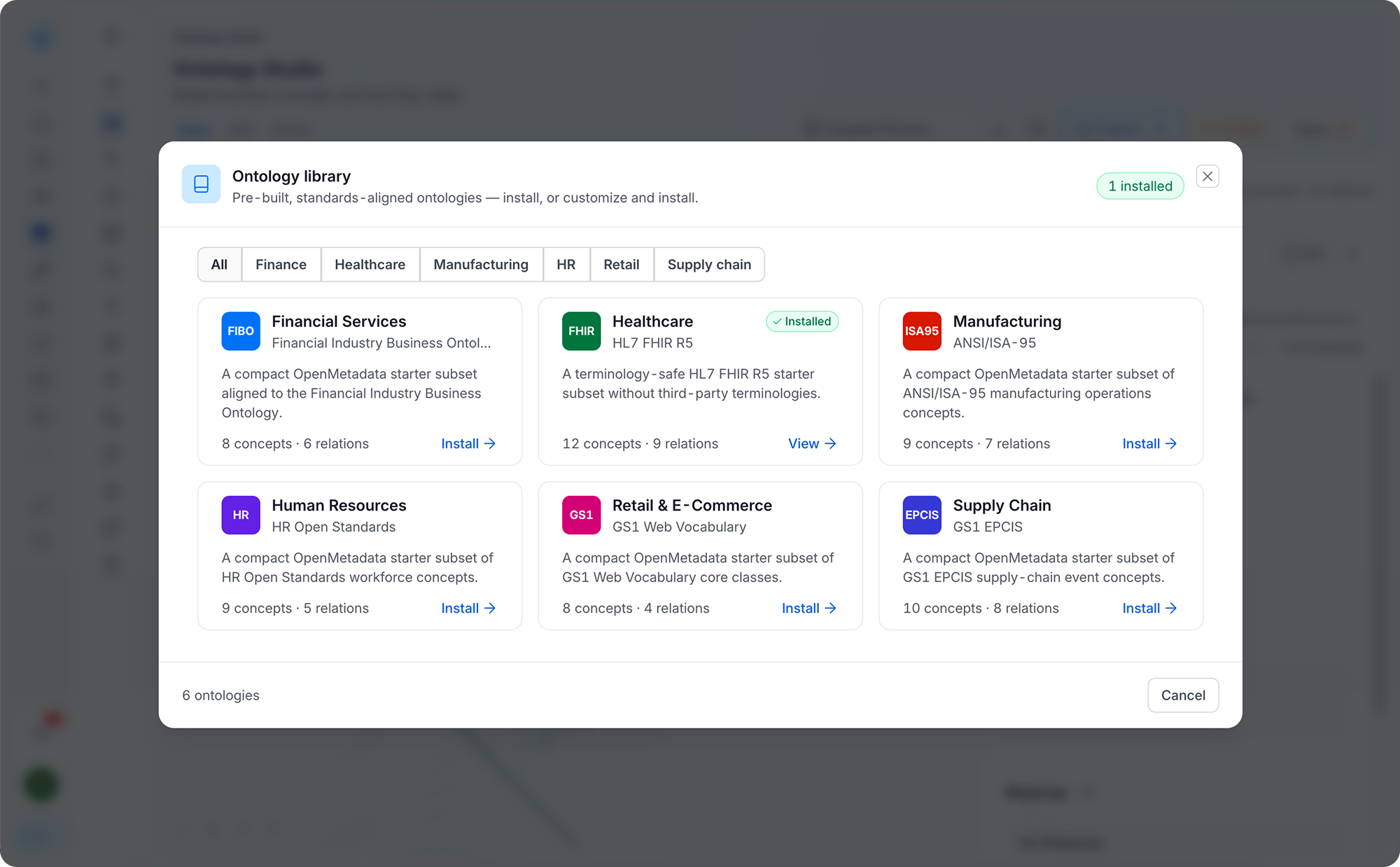
- Prebuilt industry libraries to get started faster: If you already have an ontology, import it from OWL, SKOS, JSON-LD, Turtle, or CSV, and preview what it will create before anything is saved. If you're starting fresh, the Ontology Library has packs for finance (FIBO), healthcare (HL7 FHIR), retail and product data (GS1), supply chain (EPCIS), manufacturing (ISA-95), and HR (HR Open). Install one, then extend it for your business instead of modeling from scratch. When a version is ready, publish it with the release versioning system. Teams keep working on the next draft while the published version stays fixed for AI agents and human teams to use. You can export the model at any time, with or without its links to your data.
Context and ontology are your business moat
LLMs will change, and teams will adopt new ones as they improve. The ontology that defines how your business works shouldn’t have to change with them. It captures knowledge that no model arrives with: your business definitions, relationships, and rules. If that model exists only in one vendor’s format, moving platforms may require translating or rebuilding it.
Ontology Studio uses W3C standards for ontologies. You can inspect, validate, and export the model rather than keeping it inside a proprietary schema. In practice, that lets you:
- Reuse: Start with established industry ontologies, such as FIBO for finance or HL7 FHIR for healthcare, rather than beginning from scratch.
- Specialize: Extend a published ontology for your own business while retaining its connection to the underlying standard.
- Export: Export ontologies as OWL, SKOS, JSON-LD, Turtle, or CSV with their identifiers, definitions, and relationships intact.
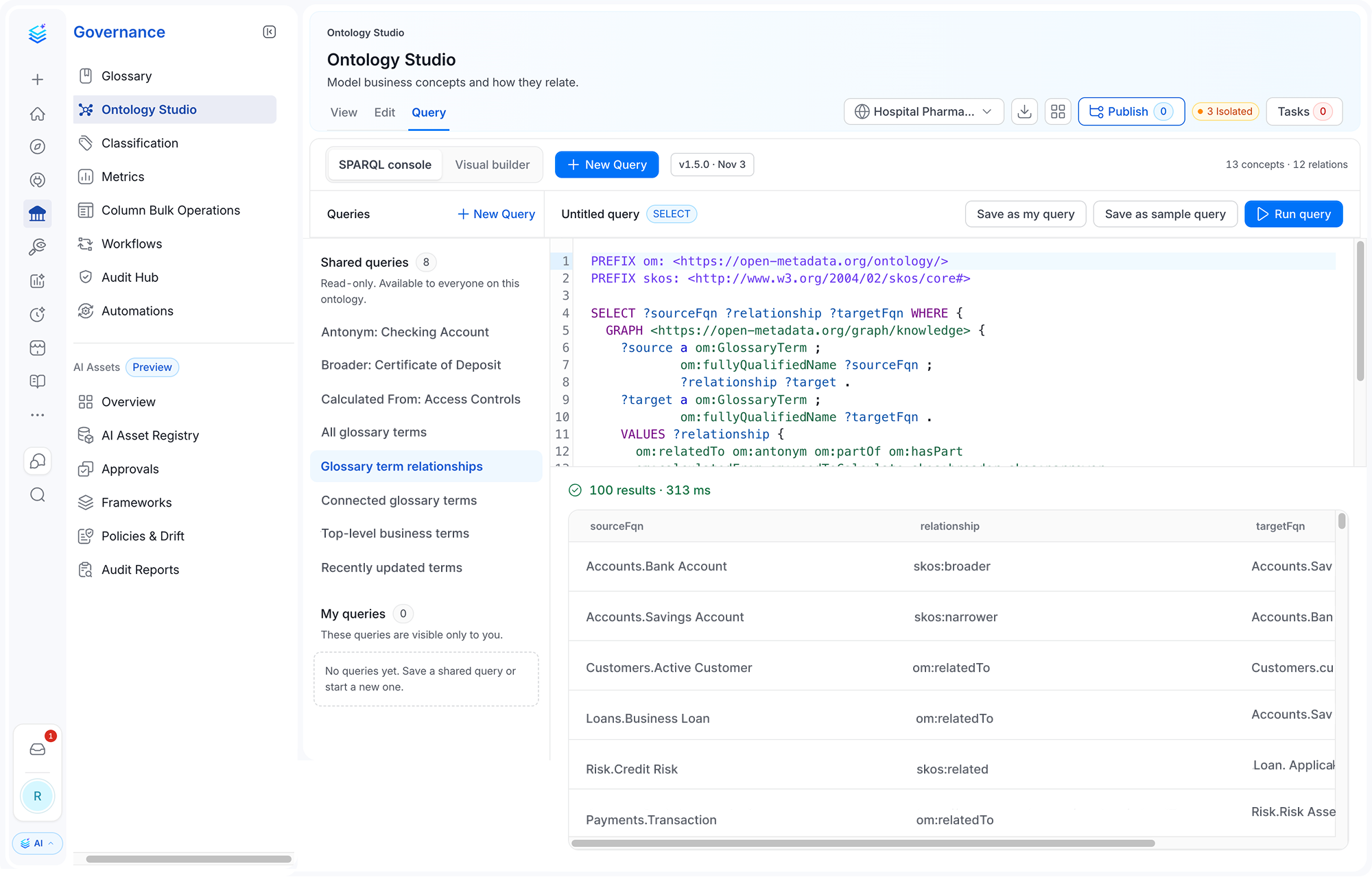
- Query: Use SPARQL against the graph through a console, visual query builder, or agent.
- Validate: Use SHACL rules to check the model and validate exports before they leave the system.
Open standards give teams more control over a business model that may need to outlast any one AI model, tool, or vendor.
How the knowledge graph puts your ontology to work
An ontology describes your business: concepts like revenue and customer, and how they relate. Collate’s knowledge graph links that ontology description to what Collate knows about your data: the tables and dashboards, who owns them, which quality tests run on them, and where the data flows. With the two connected, you can ask questions a keyword search can't answer:
- Which dashboards break if we drop this column?
- Which data classified as PII flows outside the EU?
Neither answer is stored in one place. For the first, the graph follows the column step by step to every chart built on it. For the second, it checks which data is tagged as PII and where that data is stored. Each step is a recorded connection, so anyone can see how the answer was reached.
The graph also saves agents work. Without it, an agent answering a question about revenue makes separate calls: one to find the metric, one for its definition, one for the table, one for its data quality. Each call takes time and uses tokens. With the graph, a single SPARQL query (SPARQL is the standard language for querying RDF graphs) returns the concept, its relationships, and the tables behind it at once. Collate's own agents work this way in 2.1: once they find a table, they follow its links to related metrics, domain, quality tests, and lineage.
The graph holds descriptions of your data, not the data itself. Customer records stay in your warehouse. The ontology tells an agent what revenue means and which table holds it, and the query runs in Snowflake, Databricks, or wherever the data lives.
How teams use Ontology Studio
- Ground an agent in business rules. To answer which accounts are exposed to a counterparty, an agent needs definitions of account and exposure, plus the tables that contain both. Through MCP, it can retrieve those relationships and return the query used to reach the answer for review.
- Consolidate ontology tooling. Some teams maintain a formal ontology in a separate editor, apart from the data it describes. They can import it into Ontology Studio and link its concepts to the relevant tables, instead of maintaining two disconnected models.
- Connect the same entity across systems. A billing customer and a CRM account may refer to the same entity even when no pipeline connects the two systems. Model them as one concept and bind that concept to both tables. This is particularly useful after an acquisition, when companies bring together separate operational systems.
- Find gaps in the model. Ontology health identifies concepts without relationships or data bindings. Teams can use that view to see which questions agents cannot yet answer and where to extend the model.
The outcome is a shared business model linked to the data that implements it, available to teams and agents through the same source.
Get started
Ontology Studio ships in Collate 2.1, under Governance after upgrading. To see how it works, read the Ontology Studio documentation, start with the Collate sandbox, or talk to our team about your ontology use case. For everything else in the release, read the Collate 2.1 announcement.